I recently took a fairly ordinary piece of footage and tried using AI to auto-edit it into a short video.
The material wasn't complex: two people sitting in front of a camera, talking through a batch of surfing-related products. No plot, no multi-camera setup, no fancy movement. Just talking, product cards, and subtitles. By instinct, this should have been one of the easiest categories of video for an AI editor to handle.
After several iterations, the result still wasn't ready to publish. The version that actually went out had its main cut done by hand, with AI confined to subtitles only.
The interesting part isn't that this proves "AI editing doesn't work." What it made visible is something more specific: most current auto-editing tools are still optimizing for transcript, and their understanding of what makes a video hold together is shallow.
What this auto-editing approach actually does
The tool I used was browser-use's open-source video-use project. Its positioning is clear: edit video with a coding agent. You install it inside Claude Code, Codex, or any agent environment with shell access, drop in a set of clips, and produce final.mp4 through conversation.
It doesn't hand the whole video to a "video understanding LLM" to look at. It splits the video into two layers of material first, then feeds those to the LLM.
The first layer is a word-level transcript. Every word has a timestamp, speaker info, and pause info. In other words, the LLM is mostly reading the video.
The second layer is on-demand timeline_view. Only when judging a cut point, a reaction, or a frame state does it generate a local picture strip, waveform, and word labels. Vision shows up only at critical points — like a small lamp pulled out when needed.
The LLM then generates an EDL — an edit decision list — based on the transcript: which segment to keep, from when to when, what beat it belongs to, why it's kept. ffmpeg executes the cuts, stitches them together, overlays subtitles, adds cards, normalizes audio.
This architecture is practical. Low cost, controllable, reproducible, and well-suited to programmatic execution. It handles a lot of the mechanical work that's tedious in professional editing: cut on word boundaries, avoid cutting into a word, add 30ms fades to cut points, map subtitles to the output timeline, ensure subtitles overlay last.
But it has a precondition: the video can be represented by a transcript first.
For tutorials, product demos, interview excerpts, and meeting recaps, that precondition usually holds. The structure of those is written into the words themselves.
Talking-head product reviews are different. Their structure often hides in tone, relationship, jokes, setup, callbacks, and category transitions. The things that matter most don't necessarily look like "information."
At first I thought the problem was granularity
After version one failed, my read was: the cuts are too coarse.
I had been doing sentence-level edits. The LLM picks high-information sentences from the transcript, each cut a continuous time range. The problem surfaced quickly: paragraph boundaries got cleaner, but the "ums," "thens," "you knows," repeated phrases, and loose flow inside each paragraph were all still there.
So I assumed: stop selecting at the sentence level, go to character or word level.
Round two: word-level recutting. Detect filler words, generate a deletion list, remove obvious repetition, meaningless connectors, and dense clusters of "you know / so / like." Technically a step forward. The cut was tighter and shorter.
Still bad.
Which means the problem is harder than "sentence vs. word." Word-level is just a sharper knife. If you don't know what should be cut and what should stay, sharper means more damage.
The real problem was the wrong target function
video-use's default working assumption reduces editing to one task:
Find the highest-information parts of the transcript, delete low-density content, produce a tighter video.
In many situations this target is correct. Product launch talking-heads — the audience wants the point fast. Tutorials — the audience wants less filler, more steps.
Apply "maximize information density" to a product-review video, and the target drifts.
This kind of video is held up by a different structure:
- A light hook to bring the viewer in
- A reason for the viewer to keep watching
- Products organized by category, not mechanically listed
- A small arc per product: why I needed it, which one I recommend, how I use it, who it suits
- Personal interaction and reactions kept in the middle, so the video doesn't read like a manual
- A peak recommendation moment, then a natural close
Inside this structure, a lot of "non-information" segments are doing real work.
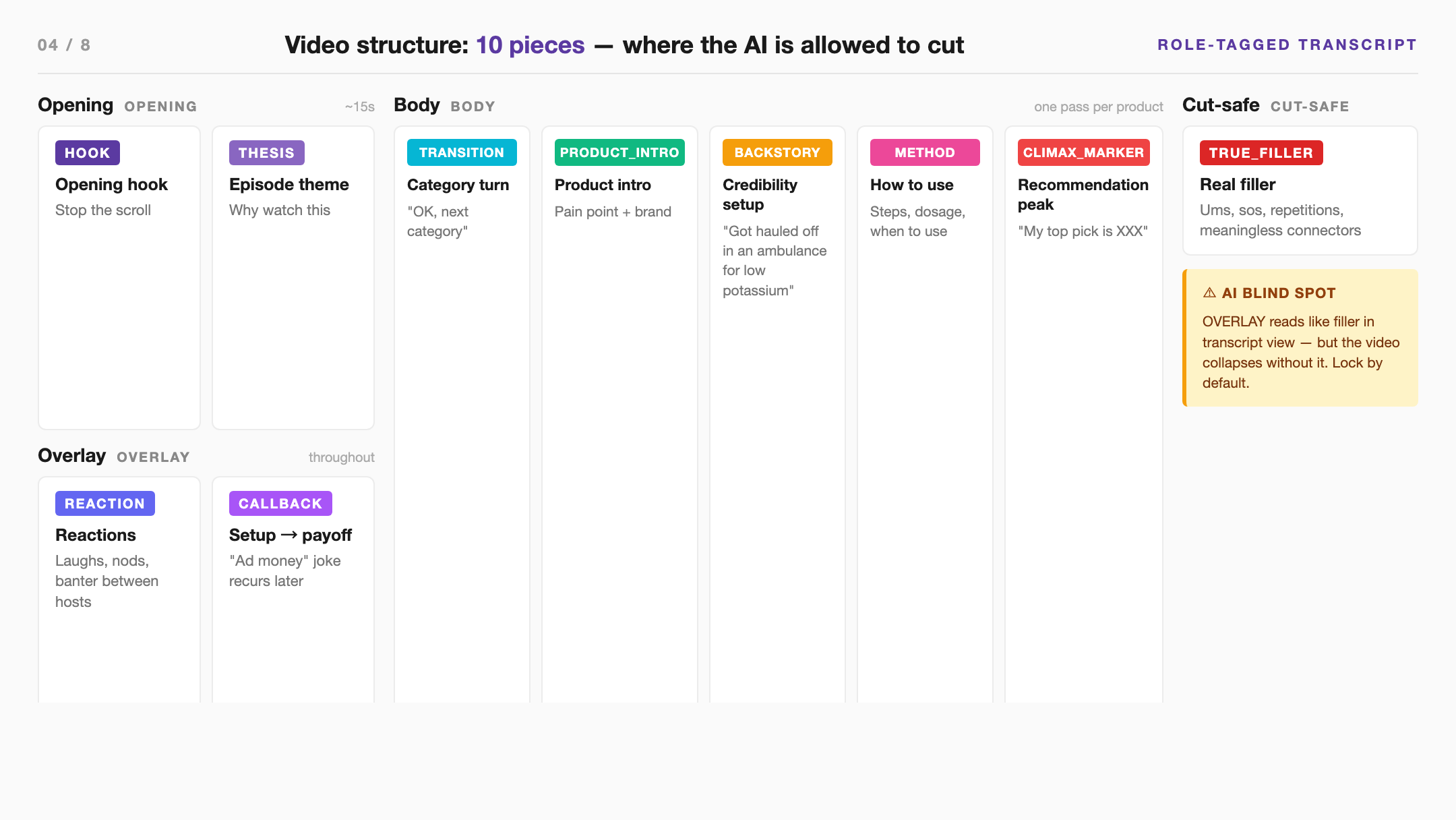
The opening joke about ad money carries no product info, but it brings people in. "OK, next category" isn't a content hit, but it's a small road sign — moves the viewer from one module to the next. A second mention of ad money in the middle is a callback. Without the earlier setup, it doesn't land. The two hosts laughing and reacting isn't noise. It carries the relationship between them. "I once got hauled off in an ambulance for low potassium" reads like personal trivia. The electrolyte recommendation that follows only stands because of it. "My top pick is La Roche-Posay B5" goes beyond the brand name itself. In that cut, it carried the recommendation peak.
Auto-editors tend to read these as deletable, because they don't fit transcript-level information density. But the finished video needs exactly this skeleton.
So the root cause of this failure: the AI was treating the video like a text manuscript that needed compression.
Why the reference looked smoother on first watch
The hand-cut version did something more than shorten raw footage. It rebuilt structure.
Top layer is the show backbone: open, theme, several categories, close. Middle layer is category organization: pre-workout, during/post-workout, recovery, hair, skin repair. Bottom layer is each individual product: pain point, brand, usage, recommendation strength.
That's why the hand-cut version, even though it's longer, doesn't drag. It has a path.
The auto-cut version has a different problem. The products are mostly there, some filler is gone, but the viewer doesn't know where they are. It's like an essay with sentences compressed but the subheads, transitional sentences, and paragraph logic deleted along the way.
A short video is, first of all, a viewing route. Cut it as a transcript compression and the flavor changes.
The problem outside any one tool
I went through the publicly demonstrated capabilities of the current major tools again. Most of them solve "execution layer" problems.
Descript's filler word feature lets you preview each one and choose how to remove it, with audio analysis to avoid harsh cuts. It cares about: will deleting this word make the audio sound bad. Whether that word is a structural piece in its paragraph — Descript doesn't decide for you. And it's primarily English-transcript focused; Chinese verbal tics like "就是 / 然后 / 这个" still need a separate tool or custom rules. Adobe Premiere Pro's text-based editing changes the timeline by editing the transcript. What it actually improves is human editor efficiency. The structural call still sits on the editor. Gling, CapCut, OpusClip can auto-delete pauses, delete filler, find short-form highlights, add subtitles, generate B-roll, do reframing. They lean toward "speed up" and "package up." The show structure of a specific talking-head still needs human judgment. DaVinci Resolve 20's AI IntelliScript and Multicam SmartSwitch go further — script matching, multi-take assembly, speaker-aware switching. But these also assume an existing script, defined camera angles, and a clear post pipeline. They're doing first pass within an established production flow.
The boundary is fairly clear: AI is already good at rough cutting, filler removal, subtitling, packaging, timeline restructuring. But if the video has no pre-written script, and its content value depends on structure, relationship, and tone inside natural conversation, it needs a structural tagging layer.
Without that layer, more automation tends to chop a video into a string of "info points."
What current solutions can and can't fix
Sliced finer, the current solutions split into four categories.
Category one: transcript editors. Descript, Premiere Pro's text-based editing, Gling, CapCut. They turn "cut the timeline" into "edit the text," dramatically lowering the cost of removing pauses, slips, and filler. Descript even decides whether deleting a particular filler will produce a harsh edit, though that capability is primarily English-transcript focused; CapCut also emphasizes preview and natural pacing. Good for first-pass cleanup. They don't decide your show structure.
Category two: clipping / repurposing tools. OpusClip is the representative. Better at pulling short-form clips out of long videos, then auto-captioning, reformatting, adding B-roll, adapting to platforms. Useful for finding highlights and packaging shorts. Recutting a natural talking-head into a complete, smooth, structured main piece is a different job.
Category three: pro NLE AI first-pass. DaVinci Resolve 20's IntelliScript organizes multiple takes against the original script. Multicam SmartSwitch handles speaker-aware multi-camera cutting. Closer to professional workflows, but the preconditions are clearer: there's a script, multiple takes, multiple cameras, or at least a clear post-production intent. Where this video stuck wasn't "cut faster" — it was that the material was never scripted, and structure had to be pulled out of natural conversation.
Category four: generative reauthoring. Research has started exploring "edit a video like text" for talking-head content: add, delete, retime spoken lines, and use generative models to fill in lip movement, gestures, and frame continuity. Imaginative direction. What it handles is "how to rewrite video naturally." "What structure should it become" still hangs above it.
Splitting this failure that way, the current tools cover plenty of local problems:
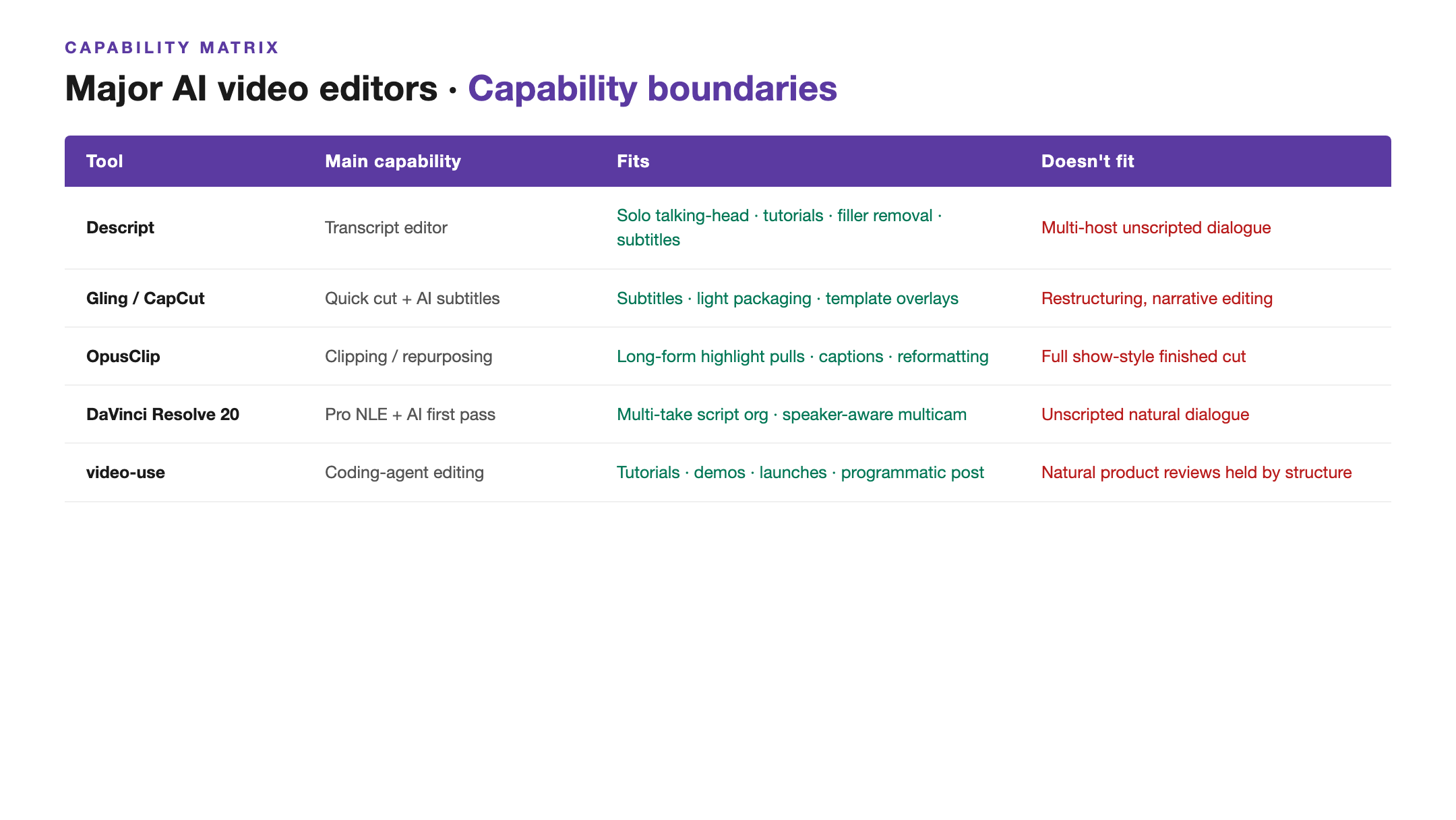
Reading the table, the takeaway becomes simple: finding a tool that deletes filler more aggressively buys very little. Before deletion, you need structural judgment.
What video-use is and isn't suited for
Going by video-use's own positioning, it's more of a "code-writing assistant editor." Carrying the chief-editor role end-to-end is too heavy for it.
Its strongest fit is tasks where structure is already fairly clear, and the editing target can be written into an EDL:
- Single-speaker or few-speaker talking heads: delete pauses, slips, false starts, keep clean delivery
- Tutorials, demos, launch videos: structure largely lives in the transcript, e.g. HOOK → PROBLEM → SOLUTION → DEMO → CTA
- Multi-take selection: pick the best take per beat from multiple recordings
- Programmatic post: subtitles, overlays, simple animation, color, audio normalization, cut-point self-checks
- First-pass rough cut: produce a reviewable version fast, then move into human polish
Common thread: the editing decisions can mostly be inferred from text and timestamps. The LLM reads the transcript, calls timeline_view at key points, and that's enough to produce a usable EDL.
This product-review material lands precisely in its weak zone:
- It's unscripted natural conversation, but the finished video needs a show structure
- Jokes, reactions, callbacks, and tone between two hosts carry content value of their own
- Whether the video is "good" depends on category organization, host dynamic, and pacing setup — information density is only part of it
- Chinese brand names, fast speech, overlapping speakers make STT and card anchoring shaky
- A product review has to arrange "why watch, what order to watch in, what to remember at the end" — products can't just be listed
So this failure doesn't cancel out video-use's value. I just placed it too far up the stack. It's well-suited to the execution layer. Sit it in the chief-editor seat before structure is decided, and the result drifts.
A possible fix: don't cut first — tag structure first
If I were to redo this, I wouldn't start with deletion.
I'd have the system produce a role-tagged transcript first. Timestamps and speaker info are the ledger. The more important field is the structural role assigned to each segment:
- HOOK: opening hook
- THESIS: this episode's theme
- CATEGORY_TRANSITION: category-to-category transition
- PRODUCT_INTRO: product introduction
- BACKSTORY: credibility setup
- METHOD: how to use it
- REACTION: reactions and dynamic
- CALLBACK: setup-and-payoff
- CLIMAX_MARKER: recommendation strength
- TRUE_FILLER: actual disposable filler
Then a three-tier structural table:
1. Top: what is this video's open, theme, major categories, close 2. Middle: under each category, which products, in what order and why 3. Bottom: per product, is the pain point, brand, usage, recommendation strength complete
After those two passes, then go to the cut list.
And every deletion has to come with a role-based reason. "This sentence has no info, cut it" isn't enough. Has to be: this is TRUE_FILLER, deletable; this is BACKSTORY, compressible but can't disappear; this is CATEGORY_TRANSITION, not deletable.
Looks like one extra table. It's actually swapping the target: from "compress text" to "preserve structure, compress redundancy."
The most workable workflow today
I don't really trust "one-click auto-edit" right now. At least not for unscripted talking-head product reviews. Don't start there.
A more realistic plan is human-machine division of labor:
Step 1: AI does material understanding — transcription, speaker separation, word-level timestamps, initial segmentation.
Step 2: AI drafts structure — tag the hook, categories, product micro-arcs, callbacks, recommendation peaks, suspect filler.
Step 3: Human reviews structure. Don't rush into per-line edit review yet. The human only needs to call: is this structure right? Which products should weigh more? Which segments are non-negotiable? Which jokes can't be cut?
Step 4: AI generates the EDL based on the approved structure: only delete inside permitted regions, shorten pauses, compress repetition.
Step 5: Mature tools handle the execution layer. Internal preview can stay on the local ffmpeg pipeline. For publish-grade content, export XML to Premiere, Final Cut, or Resolve and polish.
Step 6: Pre-delivery, do reference alignment. Length and subtitles obviously matter, but they aren't enough. Are the structural pieces still there? Is each category's runtime reasonable? Did the recommendation peak survive? Do product cards line up with the first verbal mention of the brand?
The most important shift: pull "structural review" forward. Models will get stronger, but if the order is wrong, stronger doesn't help.
For unscripted talking-head product reviews, I'd compress the workflow into:
1. Human defines structure First make the STT transcript into a paper edit. Don't cut yet. Tag every segment with a role: hook, category transition, product intro, backstory, usage, reaction, callback, recommendation peak, true filler.
2. Human reviews the structure table One row per product: category, product, recommendation reason, usage, must-keep reactions / jokes, target runtime, card-appearance point. The human reviews this table only — not 100 line-by-line deletions.
3. AI generates EDL Have video-use execute under structural constraints: delete only TRUE_FILLER; BACKSTORY/METHOD can compress only; HOOK/TRANSITION/CALLBACK/REACTION/CLIMAX default to non-deletable. Every cut carries a role-based reason.
4. Pro tool polish Internal preview can stay on video-use's ffmpeg pipeline. For publish-grade output, export XML/EDL to Premiere, Final Cut, or Resolve. A human polishes pacing, framing, and cut points.
5. Subtitles and cards get a separate final review Chinese brand names can't be fully trusted to STT. Use a manual brand list plus word-level timestamps to align. Subtitles can run AI/ASS/CapCut, but every line gets reviewed before publishing.
6. Pre-delivery reference alignment Typos are surface-level. Also check structure: is the hook still there, are category transitions still there, is each category's runtime reasonable, did the peak product survive, were callbacks accidentally cut.
The division is plain: humans do chief-editor judgment, AI does mechanical cutting and version generation. video-use's strengths fit the execution layer. The moment you let it lead the cut by information density, the show skeleton goes.
For a PMM, the actual math doesn't quite work
There's a more practical body-feel from this round: for simpler videos, editing it yourself, paired with mature tools like CapCut or Jianying with their built-in AI subtitles, auto-detection, templates and packaging, is faster.
That sounds counterintuitive. Projects like video-use are more "AI native," more open, more controllable, more automated. But real-world efficiency has to fold in setup cost, debug cost, rework cost, and review cost.
For a PMM, video production isn't usually a stable industrial pipeline running daily. More often it's one piece for a launch, an event, a product update, or a social post. Materials aren't standardized, scripts aren't complete, the call on what makes a finished video is subjective. The real time sink is "how should this content actually be told" — second 38 to second 42 is downstream of that.
In that situation, the time AI editing skills save is genuinely limited. Sometimes, between transcription, rule-writing, EDL review, subtitle troubleshooting, card fixes, and re-rendering, the total is longer than just hand-cutting it.
More precisely: AI editing projects right now fit highly structured, scalable, repeatable industrial scenarios:
- High-frequency output of similar videos
- Defined scripts or templates
- Stable structure, rule-encodable judgment standards
- Large rough-cut volume, human only spot-checks
- Team willing to invest in pipeline build first, amortize later
For PMM-ish roles, especially "occasionally need to make one video" cases, the lift is unstable. Mature editing software + built-in AI captioning/packaging + human judgment is still the highest-ROI option a lot of the time.
This isn't to say video-use-style tools have no value. The value just doesn't land on "let a PMM occasionally making a video save time immediately." They look more like infrastructure for future structured video production lines: when video type is fixed, output volume is high enough, and process can be standardized, transparent EDLs, reproducible pipelines, and automated post start to make economic sense.
A bit further out
On the research side, generative video editing is moving toward "rewriting video." A 2026 talking-head paper has started exploring adding, deleting, and retiming spoken lines using audio and text, with video infill keeping lip-sync and motion consistent.
This kind of capability could solve a different problem down the road: today's editing can only delete and stitch existing material — it can't rewrite expression naturally. Once talking-head reauthoring matures, the system won't have to stop at deleting "ums." It can rewrite a loose passage to flow better and generate matching mouth movement and gestures.
But it doesn't save this failure. Even with future rewriting, the system still has to know which structures to preserve and which expressions are worth rewriting.
Generative capability raises the execution ceiling. It doesn't automatically solve editorial judgment.
Closing
After this experiment, my expectation of AI editing got a lot more concrete.
I no longer think of it as "drop in the material, get a finished cut." A more reasonable read: AI can compress a lot of mechanical labor, but it needs an explicit structural target.
Transcript-first solutions like video-use are pointing in the right direction: controllable, transparent, deployable, and better suited to iteration than black-box one-click editing. To handle natural talking-head content, piling on more filler-word rules buys little. The next layer to add is structure.
The problem in this failure isn't that the AI couldn't cut filler.
The problem is that I had it cut filler before teaching it to tell what isn't filler at all.
---
Further reading:
- browser-use/video-use open-source project: https://github.com/browser-use/video-use
- Descript filler word removal: https://help.descript.com/hc/en-us/articles/10164806394509-Filler-words
- Adobe Premiere Pro text-based editing: https://helpx.adobe.com/premiere-pro/using/video/text-based-editing-video.html
- Gling AI text-based video editor: https://www.gling.ai/save-time
- OpusClip ClipAnything / text-based editor: https://help.opus.pro/docs/article/introduction-to-opusclip
- CapCut filler word remover: https://www.capcut.com/tools/filler-words
- DaVinci Resolve 20 New Features Guide: https://documents.blackmagicdesign.com/SupportNotes/DaVinci_Resolve_20_New_Features_Guide.pdf
- EditYourself: Audio-Driven Generation and Manipulation of Talking Head Videos: https://arxiv.org/abs/2601.22127
- Filler Word Detection and Classification: https://arxiv.org/abs/2203.15135